Introduction
The Observer is one of the behavioral design patterns. It establishes a subscription mechanism where one or more objects, known as Observers, monitor changes in another object called the Subject. When the Subject’s state changes, it notifies all registered Observers. The Observers can react in different ways for the same notification, enhancing flexibility.
This pattern finds application in scenarios involving one-to-many relationships, particularly when dependent objects need automatic notification.
Problem
Imagine being football fans, constantly checking live match results of our favourite clubs through an app. What are the options to receive live match updates?
Firstly, manually opening the app every time to check for updates can be tedious, especially when scores remain unchanged. It results in a waste of time and effort.
Alternatively, the app could employ notification system. However, sending notifications to all registered users might cause unnecessary interruptions for supporters of different clubs.
To avoid this scenarios, the app could utilize the Observer pattern. It allows users to subscribe the specific matches and receive notifications only for their chosen games. This approach minimizes unnecessary notifications and ensures timely updates for interested users.
Structure
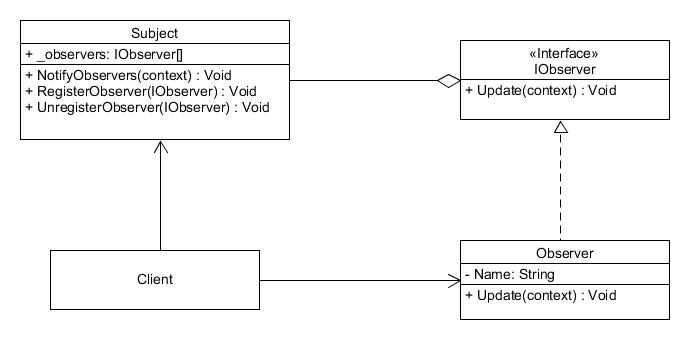
IObserver: Observer interface. It declares the Update method, which concrete observers implement.
Observer: Concrete observer. It implements the Update method from the observer interface. Each observer of a particular subject must implements the same observer interface.
Subject: Subject class. It manages a collection of observers and provides methods to register and unregister observers as well as a method to notify all registered observers of any changes.
Client: Client class. It creates observers and subjects objects.
Implementation
// C# code

// Observer interface
public interface IObserver
{
    public void Update(string context);
}

// Concrete observer
public class Observer : IObserver
{
    public string Name { get; set; }

    public Observer(string name)
    {
        Name = name;
    }

    public void Update(string context)
    {
        Console.WriteLine($"{Name} notified: {context}");
    }
}

// Subject class
public class Subject
{
    private List<IObserver> _observers = new List<IObserver>();

    public void RegisterObserver(IObserver observer)
    {
        _observers.Add(observer);
    }

    public void UnregisterObserver(IObserver observer)
    {
        _observers.Remove(observer);
    }

    // Notify each observer saved in the list
    public void NotifyObservers(string context)
    {
        foreach (IObserver observer in _observers)
        {
            observer.Update(context);
        }
    }
}
internal class Program
{
    static void Main(string[] args)
    {
        // Create observers and subject
        var observer1 = new Observer("Observer 1");
        var observer2 = new Observer("Observer 2");
        var subject = new Subject();

        // Register first observer
        subject.RegisterObserver(observer1);
        // Notify only observer 1
        subject.NotifyObservers("Goal !!!");

        // Register second observer
        subject.RegisterObserver(observer2);
        // Notify observer 1 and observer 2
        subject.NotifyObservers("Goal !!!");

        // Unregister first observer
        subject.UnregisterObserver(observer1);
        // Notify only observer 2
        subject.NotifyObservers("Goal !!!");
    }
}
Result:
Observer 1 notified: Goal !!!
Observer 1 notified: Goal !!!
Observer 2 notified: Goal !!!
Observer 2 notified: Goal !!!Conclusion
The client decides which observers to register in the subject to receive notifications. At any moment, a particular observer could be unregistered and from that moment it does not receive notifications from the subject. The Observer pattern should be utilized when the set of objects depends on the state of another object. The number of objects in the set does not have to be known at the beginning, because observers can be registered and unregistered during the program, enhancing flexibility and adaptability.
Observer pattern aligns with:
- Open/Closed Principle: New observer classes can be added without requiring modifications to the existing subject class, enhancing extensibility.